Setting a ROI on GENX320MP and masking the hot pixels in that ROI
Hi,
I am trying to to mask some hot pixels in a given ROI on the GENX320 MP. I looked at this page : https://support.prophesee.ai/portal/en/kb/articles/how-to-mask-the-effect-of-crazy-hot-pixel
I have the coordinates of the pixels i'd like to mask. But my method for masking doesn't seem to work :
I tried using the HAL Pyton SDK with the get_i_roi() and get_i_toi_pixel_mask() facilities but I can't make them work together. As a test, I defined a ROI of 2 pixels and tried to mask one of the two. The ROI of 2 pixels works fine, but when I add the mask on one of the 2 pixels, i read events from the whole matrix (i didn't check if it was the whole matrix except the masked pixel). Here is the extract from my data recording code : 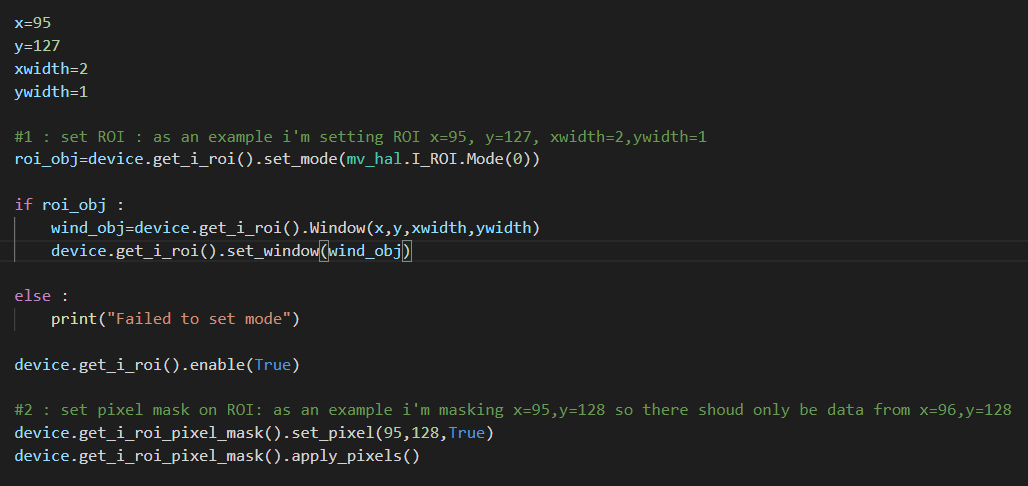
I tried switching stages #1 and # 2 in the code but in that case, the masking is ignored and i get events from the 2-pixel ROI.
For setting the ROI, i used the code from this topic : https://support.prophesee.ai/portal/en/community/topic/how-to-use-i-roi-in-python-i-am-trying-to-do-some-blob-detection-and-then-use-that-to-set-i-roi
As an alternative, I tried using the get_i_digital_event_mask() facility but it seems that in python the only method i can use is :

The other method would be to configure the pixels by writing in the control registers but I was wondering if there was another possible solution without using STC filters or bias tunnig ?
Cheers,
Michael